Practical Homelab / Compute & Orchestration

Deploying Kubernetes using Terraform, Proxmox, Ansible, and K3s
/Compute & Orchestration/#kubernetes

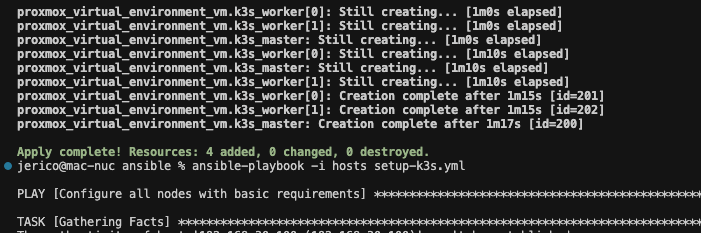
Terminal output showing the automated creation of K3s worker and master virtual machines in a Proxmox environment.

I’ve been meaning to try Kubernetes for a long time, but I kept finding excuses. It’s been at the back of my mind marinating for yeaaars.

One thing I absolutely did not want to do was spend hours clicking through admin panels just to get something working. I recently learned there’s a term for this: ClickOps. I developed a strong aversion to this way of doing things when I transitioned to Cloud Engineering. Clicking things can get old fast.

Terraform + Proxmox

There is barely any overlap with what I do at my full-time job and my homelab projects. We use Terraform at work to manage AWS resources. I use Proxmox for all my servers.

I knew there was a Proxmox provider for Terraform, but I hadn’t seriously considered it. Seeing how vastly different the “resources” looked compared to AWS provider.

I gave it a shot, and it worked beautifully. There’s something exciting about finally bridging the gap between the tools I use at work and the ones I use in my homelab.

This solved my VM provisioning problem.

This is the only Proxmox provider I recommend: https://github.com/bpg/terraform-provider-proxmox. I ran into issues with all the others.

Ansible for configuration management

Next, I needed a way to handle configuration management. While Terraform can invoke Bash scripts, it doesn’t track configuration changes well. This led me to another tool I had been meaning to try: Ansible.

Prior to this project, I’ve been only reading about it in passing. No actual experience at all. This was a good excuse to try it out.

Wrapping up

My primary goal is reproducibility. What I want is the config I’ll write now, I can reuse later on. I can destroy, and rebuild to make it easy to experiment.

Here’s what the process looks like for creating a new Kubernetes cluster once Proxmox is up and running:

terraform init
terraform apply
cd ansible
ansible-playbook -i hosts setup-k3s.yml
export KUBECONFIG=./k3s.yaml
kubectl get nodes

That’s it! The setup is fully reproducible, and I now have a fresh Kubernetes cluster.

https://github.com/jerico/terraform-proxmox-k3s

Next step is actually running things on the cluster 😄
Related: Setting up Traefik as a Reverse Proxy in Proxmox.

Proxmox iGPU Passthrough only works on Windows guests

/Compute & Orchestration/#proxmox

I wanted to passthrough UHD 630 to a DSM guest. I thought that PCIe passthrough in Proxmox has matured enough that it would be a straightforward task to assign my iGPU Intel UHD 630 to a Linux guest.

This was not the case.

I’m getting the following errors on Linux and Mac guests.

Host error log

DMAR: [DMA Write NO_PASID] Request device [c7:00.0] fault addr 0x27af3000 [fault reason 0x05] PTE Write access is not set

DSM error log

[ 4.093363] i915 0000:01:00.0: Invalid ROM contents
[ 4.095707] [drm:gen9_set_dc_state [i915]] *ERROR* DC state mismatch (0x0 -> 0x2)
[ 4.103321] [drm] Finished loading DMC firmware i915/kbl_dmc_ver1_04.bin (v1.4)
[ 5.754708] i915 0000:01:00.0: Resetting rcs0 after gpu hang
[ 5.755644] i915 0000:01:00.0: Resetting bcs0 after gpu hang
[ 5.756533] i915 0000:01:00.0: Resetting vcs0 after gpu hang
[ 5.757376] i915 0000:01:00.0: Resetting vecs0 after gpu hang
[ 7.707272] i915 0000:01:00.0: Resetting chip after gpu hang
[ 7.708617] i915 0000:01:00.0: GPU recovery failed
[ 7.716928] [drm] Initialized i915 1.6.0 20171222 for 0000:01:00.0 on minor 0
[ 8.107294] i915 0000:01:00.0: fb0: inteldrmfb frame buffer device
[ 8.702947] i915 0000:01:00.0: HDMI-A-1: EDID is invalid:
[ 42.201199] i915 0000:01:00.0: HDMI-A-2: EDID is invalid:

Things I tried

Blacklisting iGPU on boot

I followed https://3os.org/infrastructure/proxmox/gpu-passthrough/igpu-passthrough-to-vm/#proxmox-configuration-for-igpu-full-passthrough with all the modifications to the Proxmox host. Results are the same.

  • Blacklisting iGPU so the host won’t initialize it.

Use a vbios file

I tried using a vbios romfile from https://github.com/patmagauran/i915ovmfPkg to re-initiate the GPU. Results are the same.

  • Copied the rom file to /usr/share/kvm/ and added romfile=<vbios>.rom to hostpci0 in /etc/pve/qemu-server/<VMID>.conf.

SR-IOV

I briefly considered using SR-IOV https://github.com/strongtz/i915-sriov-dkms but it looks like a lot of work. Host and guest have to support it. I have limited control over DSM.

Probably in the future if I have a use-case of passing through iGPU to a guest.

Other useful resources

Related: Enable IOMMU on Proxmox, Plus Real IOMMU Groups and Xpenology DSM 7.2 on Proxmox: Boot Disk, USB Bootloader and AME Patch.

Emulate an NVMe Drive in a Proxmox VM with QEMU Args

/Compute & Orchestration/#proxmox

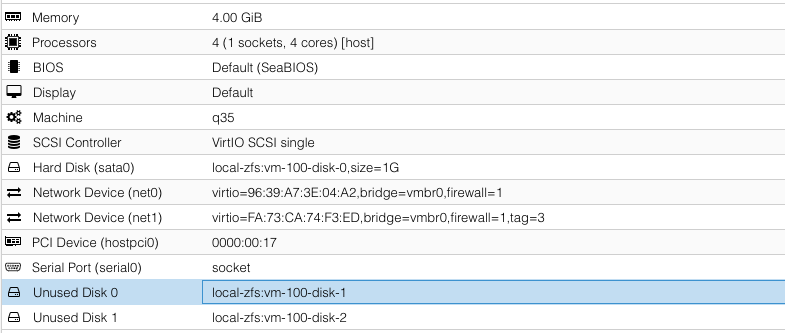
Proxmox does not yet support adding NVME drives using the web interface. It has to be added using a custom args for QEMU.

To do so, open the VM config file in a text editor: vi /etc/pve/qemu-server/100.conf

args: -drive file=/dev/zvol/rpool/data/vm-100-disk-1,if=none,id=nvme1 -device nvme,drive=nvme1,serial=nvme1

file is the location of the image in the hard drive. Since I’m using ZFS, it is in /dev/zvol/rpool/data/vm-100-disk-1.

Proxmox VM hardware configuration screen showing an unattached Unused Disk 1.

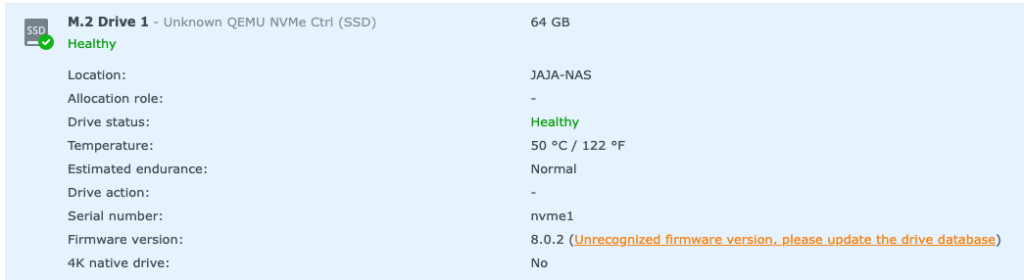
I created this image using the Web UI but it is unattached. It is created in a real NVME disk.

Proxmox UI showing a healthy 64 GB M.2 Drive 1 emulated as an NVMe device.

device is how it will show-up in the guest.

QEMU docs on NVME emulation: https://www.qemu.org/docs/master/system/devices/nvme.html

Patch for Proxmox NVME emulation that has not yet been merged: https://bugzilla.proxmox.com/show_bug.cgi?id=2255

Related: Segfault Using an Emulated NVMe as SSD Cache in Synology DSM.

Enable IOMMU on Proxmox, Plus Real IOMMU Groups

/Compute & Orchestration/#proxmox #virtualization #hardware

This is how I turn on IOMMU in Proxmox before trying PCIe passthrough.

Enable IOMMU in GRUB

vi /etc/default/grub
Find the line with "GRUB_CMDLINE_LINUX_DEFAULT"
Add `intel_iommu=on` or `amd_iommu=on`
Save
update-grub

PCIe ACS Override

There are motherboards that bundle peripherals together (does not support ACS).

A workaround is to override PCIe ACS by adding pcie_acs_override=downstream,multifunction in GRUB_CMDLINE_LINUX_DEFAULT.

This flags the kernel that a device can be “isolated”. It might have security and stability issues.

References:

IOMMU groups on real hardware

Whether passthrough works depends on how the board groups its devices. These are two machines I checked.

Asus Chromebox CN62

Linux device list showing IOMMU values for various hardware components on a Lenovo ThinkCentre.

It cannot passthrough the GPU

Lenovo ThinkCentre M920s

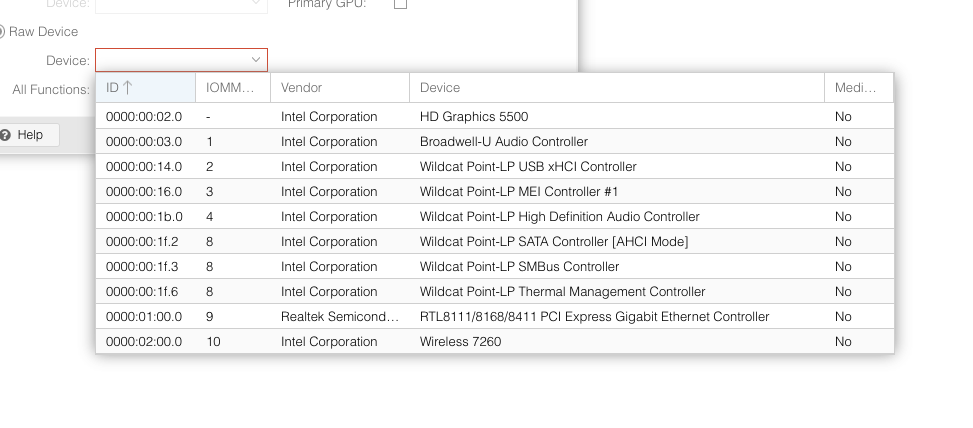
Proxmox PCI device selection menu showing various Intel Corporation devices and their IOMMU group IDs.

iGPU and SATA controller is in its own group

Related: Proxmox iGPU Passthrough only works on Windows guests and Attempted to make XFX RX 460 work on a macOS KVM.

Attempted to make XFX RX 460 work on a macOS KVM

/Compute & Orchestration/#virtualization

For the past couple of days (when I’m procrastinating), I’ve been attempting to make an XFX RX 460 work as a GPU passthrough on a macOS KVM.

Ready-made macOS VM

Flashing a different BIOS

# Display all adaptors detected
./amdvbflash -ai
# Get info about the rom file
./amdvbflash -biosfileinfo vbios.rom
# Save bios
./amdvbflash -s 0 original_rom
# Force flash a rom
./amdvbflash -f -p 0 ./original_rom

Where to get BIOS rom files

https://www.techpowerup.com/vgabios/

TechPowerUp Video BIOS Collection table showing various RX 460 graphics card BIOS versions for download.

How to know which BIOS are compatible

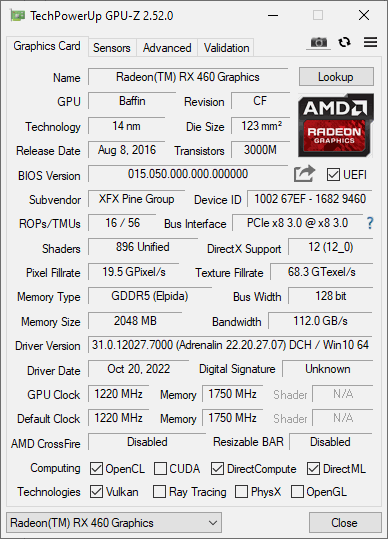
Run GPU-Z. Take note of the memory type and size.

TechPowerUp GPU-Z window showing specifications for an XFX Radeon RX 460 graphics card.

Setting Proxmox to use a rom file

Where are the rom files located

/usr/share/kvm/romfile.rom

How to use the romfile

vi /etc/pve/qemu

Add romfile=romfilename.rom to hostpci0.

Giving up

I think I’ve tried almost all BIOS compatible with my graphics card. I was not able to make it work.

Too much time has been spent. I could have bought a fully compatible one if I worked for the same amount of time I spent on this.

It was a good try, but I need to cut my losses (of time).

Related: Enable IOMMU on Proxmox, Plus Real IOMMU Groups.