This is how I turn on IOMMU in Proxmox before trying PCIe passthrough.
Enable IOMMU in GRUB
vi /etc/default/grub
Find the line with "GRUB_CMDLINE_LINUX_DEFAULT"
Add `intel_iommu=on` or `amd_iommu=on`
Save
update-grub
PCIe ACS Override
There are motherboards that bundle peripherals together (does not support ACS).
A workaround is to override PCIe ACS by adding
pcie_acs_override=downstream,multifunction in
GRUB_CMDLINE_LINUX_DEFAULT.
This flags the kernel that a device can be “isolated”. It might have security and stability issues.
References:
- [PATCH] pci: Enable overrides for missing ACS capabilities https://lkml.org/lkml/2013/5/30/513
- IOMMU Groups, inside and out http://vfio.blogspot.com/2014/08/iommu-groups-inside-and-out.html
IOMMU groups on real hardware
Whether passthrough works depends on how the board groups its devices. These are two machines I checked.
Asus Chromebox CN62
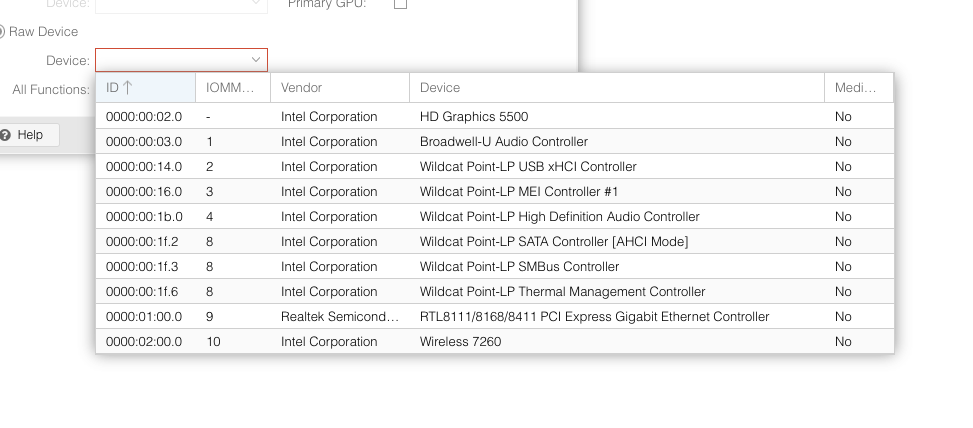
It cannot passthrough the GPU
Lenovo ThinkCentre M920s

iGPU and SATA controller is in its own group
Related: Proxmox iGPU Passthrough only works on Windows guests and Attempted to make XFX RX 460 work on a macOS KVM.