#virtualization

2 posts.

Enable IOMMU on Proxmox, Plus Real IOMMU Groups

This is how I turn on IOMMU in Proxmox before trying PCIe passthrough.

Enable IOMMU in GRUB

vi /etc/default/grub
Find the line with "GRUB_CMDLINE_LINUX_DEFAULT"
Add `intel_iommu=on` or `amd_iommu=on`
Save
update-grub

PCIe ACS Override

There are motherboards that bundle peripherals together (does not support ACS).

A workaround is to override PCIe ACS by adding pcie_acs_override=downstream,multifunction in GRUB_CMDLINE_LINUX_DEFAULT.

This flags the kernel that a device can be “isolated”. It might have security and stability issues.

References:

IOMMU groups on real hardware

Whether passthrough works depends on how the board groups its devices. These are two machines I checked.

Asus Chromebox CN62
Linux device list showing IOMMU values for various hardware components on a Lenovo ThinkCentre.

It cannot passthrough the GPU

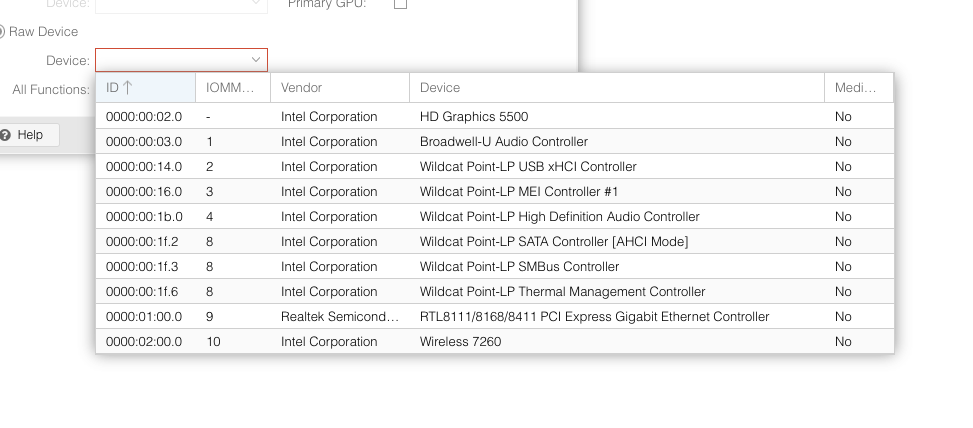
Lenovo ThinkCentre M920s

Proxmox PCI device selection menu showing various Intel Corporation devices and their IOMMU group IDs.

iGPU and SATA controller is in its own group

Related: Proxmox iGPU Passthrough only works on Windows guests and Attempted to make XFX RX 460 work on a macOS KVM.

Attempted to make XFX RX 460 work on a macOS KVM

/ Compute /

For the past couple of days (when I’m procrastinating), I’ve been attempting to make an XFX RX 460 work as a GPU passthrough on a macOS KVM.

Ready-made macOS VM

Flashing a different BIOS

# Display all adaptors detected
./amdvbflash -ai
# Get info about the rom file
./amdvbflash -biosfileinfo vbios.rom
# Save bios
./amdvbflash -s 0 original_rom
# Force flash a rom
./amdvbflash -f -p 0 ./original_rom

Where to get BIOS rom files

https://www.techpowerup.com/vgabios/

TechPowerUp Video BIOS Collection table showing various RX 460 graphics card BIOS versions for download.

How to know which BIOS are compatible

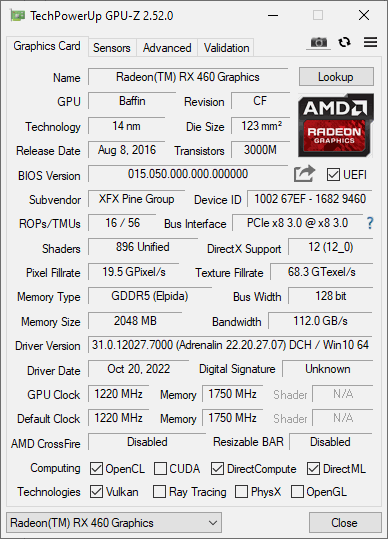
Run GPU-Z. Take note of the memory type and size.

TechPowerUp GPU-Z window showing specifications for an XFX Radeon RX 460 graphics card.

Setting Proxmox to use a rom file

Where are the rom files located

/usr/share/kvm/romfile.rom

How to use the romfile

vi /etc/pve/qemu

Add romfile=romfilename.rom to hostpci0.

Giving up

I think I’ve tried almost all BIOS compatible with my graphics card. I was not able to make it work.

Too much time has been spent. I could have bought a fully compatible one if I worked for the same amount of time I spent on this.

It was a good try, but I need to cut my losses (of time).

Related: Enable IOMMU on Proxmox, Plus Real IOMMU Groups.