Proxmox does not yet support adding NVME drives using the web interface. It has to be added using a custom args for QEMU.
To do so, open the VM config file in a text editor:
vi /etc/pve/qemu-server/100.conf
args: -drive file=/dev/zvol/rpool/data/vm-100-disk-1,if=none,id=nvme1 -device nvme,drive=nvme1,serial=nvme1
file is the location of the image in the hard drive. Since I’m using ZFS, it
is in /dev/zvol/rpool/data/vm-100-disk-1.
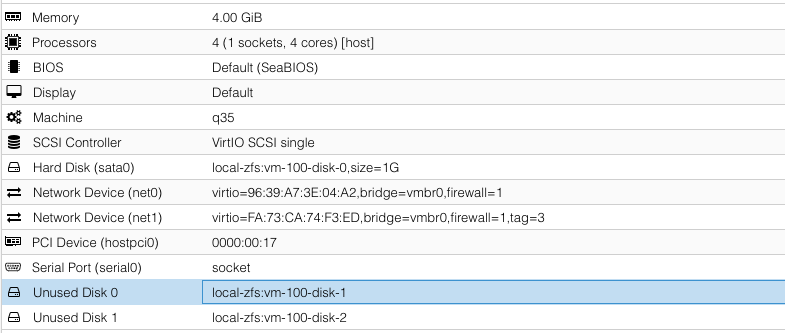
I created this image using the Web UI but it is unattached. It is created in a real NVME disk.
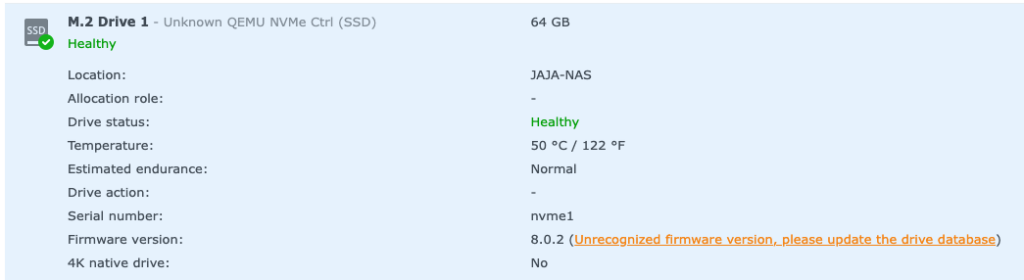
device is how it will show-up in the guest.
QEMU docs on NVME emulation: https://www.qemu.org/docs/master/system/devices/nvme.html
Patch for Proxmox NVME emulation that has not yet been merged: https://bugzilla.proxmox.com/show_bug.cgi?id=2255