#proxmox

4 posts.

Setting up Traefik as a Reverse Proxy in Proxmox
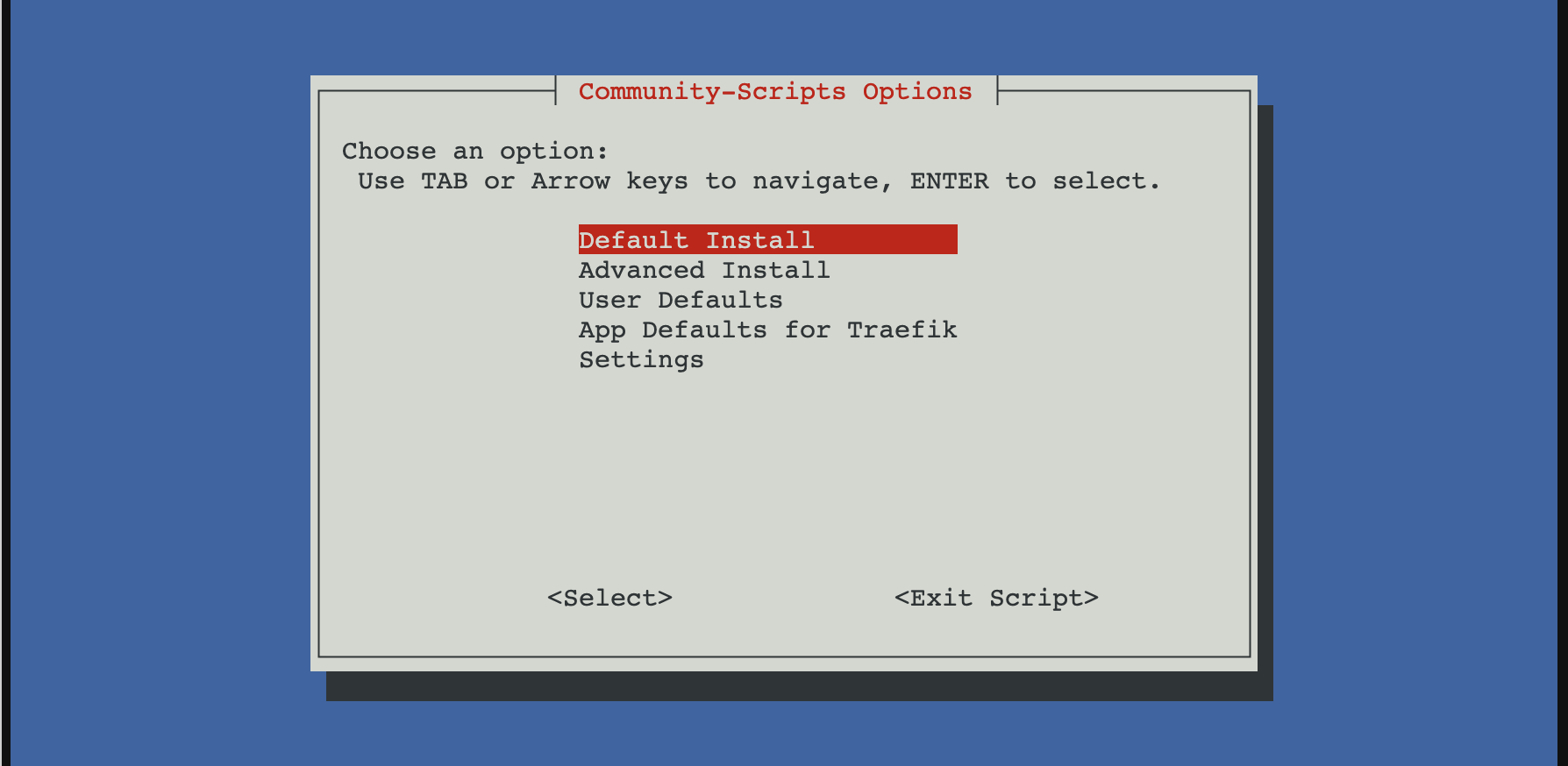
Proxmox community script options for Traefik

I wanted a simple way to run Traefik in my homelab with minimal setup friction, so I started with the Proxmox community script. It spins up a working LXC with Traefik already installed and running. I use it as a replacement for Nginx Proxy Manager and as the single entry point to every service in my homelab.

Install Traefik using the Proxmox community script

From the Proxmox host:

bash -c "$(curl -fsSL https://raw.githubusercontent.com/community-scripts/ProxmoxVE/main/ct/traefik.sh)"

After install, Traefik runs as a systemd service inside the LXC.

Static config:

/etc/traefik/traefik.yaml

Dynamic config (file provider):

/etc/traefik/conf.d/

Basic layout

I kept things simple and explicit.

  • Static config for entry points, providers, ACME
  • File provider for routers and services
  • One service per file

This makes failures obvious and debugging easier.

Entry points

No global redirects.

entryPoints:
  web:
    address: ":80"
  websecure:
    address: ":443"

Redirects are handled later using middleware.

File provider

Enabled in the static config:

providers:
  file:
    directory: /etc/traefik/conf.d/
    watch: true

Let’s Encrypt with HTTP-01

This is where most of the issues were.

certificatesResolvers:
  letsencrypt:
    acme:
      email: "[email protected]"
      storage: /etc/traefik/ssl/acme.json
      httpChallenge:
        entryPoint: web

Key points:

  • HTTP-01 must be explicitly enabled
  • Port 80 must not force-redirect to HTTPS
  • The ACME storage path must be exact

A single-character typo in the storage path caused Traefik to fail silently. acme.json stayed empty and no certificate was ever requested.

Router example

http:
  routers:
    nvr:
      rule: "Host(`nvr.example.com`)"
      entryPoints:
        - websecure
      tls:
        certResolver: letsencrypt
      service: nvr

  services:
    nvr:
      loadBalancer:
        servers:
          - url: "http://192.168.0.155:5000"

ACME only runs after a router with tls.certResolver matches an incoming HTTPS request. Nothing happens on startup.

Redirect HTTP to HTTPS properly

Do not use entryPoint-level redirects. They break ACME.

Use middleware instead:

http:
  middlewares:
    redirect-https:
      redirectScheme:
        scheme: https
        permanent: true

Apply it only to normal routers.

Logging with systemd

Traefik was running, but logs were invisible until logging was explicitly enabled.

log:
  level: DEBUG

Once enabled, journald immediately showed useful errors like:

HTTP challenge is not enabled

Without logs, this setup looks like it is working while doing nothing.

Notes

  • EntryPoint-level redirects break ACME
  • HTTP-01 must be explicitly enabled
  • Traefik fails silently on ACME storage path errors
  • Certificates are requested only after a matching HTTPS request
  • Logs are not optional when running under systemd

Once those were aligned, Let’s Encrypt issued certificates immediately.

After setting Traefik, I just need to configure my router to forward external requests to my Traefik local IP, then it will proxy the request to another service based on the domain.
Proxmox iGPU Passthrough only works on Windows guests

/ Compute /

I wanted to passthrough UHD 630 to a DSM guest. I thought that PCIe passthrough in Proxmox has matured enough that it would be a straightforward task to assign my iGPU Intel UHD 630 to a Linux guest.

This was not the case.

I’m getting the following errors on Linux and Mac guests.

Host error log

DMAR: [DMA Write NO_PASID] Request device [c7:00.0] fault addr 0x27af3000 [fault reason 0x05] PTE Write access is not set

DSM error log

[ 4.093363] i915 0000:01:00.0: Invalid ROM contents
[ 4.095707] [drm:gen9_set_dc_state [i915]] *ERROR* DC state mismatch (0x0 -> 0x2)
[ 4.103321] [drm] Finished loading DMC firmware i915/kbl_dmc_ver1_04.bin (v1.4)
[ 5.754708] i915 0000:01:00.0: Resetting rcs0 after gpu hang
[ 5.755644] i915 0000:01:00.0: Resetting bcs0 after gpu hang
[ 5.756533] i915 0000:01:00.0: Resetting vcs0 after gpu hang
[ 5.757376] i915 0000:01:00.0: Resetting vecs0 after gpu hang
[ 7.707272] i915 0000:01:00.0: Resetting chip after gpu hang
[ 7.708617] i915 0000:01:00.0: GPU recovery failed
[ 7.716928] [drm] Initialized i915 1.6.0 20171222 for 0000:01:00.0 on minor 0
[ 8.107294] i915 0000:01:00.0: fb0: inteldrmfb frame buffer device
[ 8.702947] i915 0000:01:00.0: HDMI-A-1: EDID is invalid:
[ 42.201199] i915 0000:01:00.0: HDMI-A-2: EDID is invalid:

Things I tried

Blacklisting iGPU on boot

I followed https://3os.org/infrastructure/proxmox/gpu-passthrough/igpu-passthrough-to-vm/#proxmox-configuration-for-igpu-full-passthrough with all the modifications to the Proxmox host. Results are the same.

  • Blacklisting iGPU so the host won’t initialize it.

Use a vbios file

I tried using a vbios romfile from https://github.com/patmagauran/i915ovmfPkg to re-initiate the GPU. Results are the same.

  • Copied the rom file to /usr/share/kvm/ and added romfile=<vbios>.rom to hostpci0 in /etc/pve/qemu-server/<VMID>.conf.

SR-IOV

I briefly considered using SR-IOV https://github.com/strongtz/i915-sriov-dkms but it looks like a lot of work. Host and guest have to support it. I have limited control over DSM.

Probably in the future if I have a use-case of passing through iGPU to a guest.

Other useful resources

Emulate NVME drive in Proxmox

/ Compute /

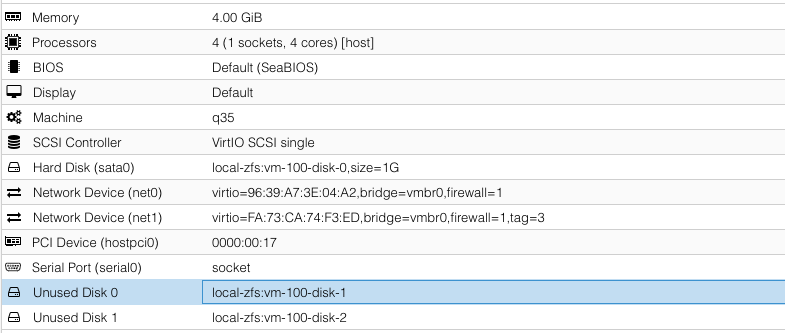
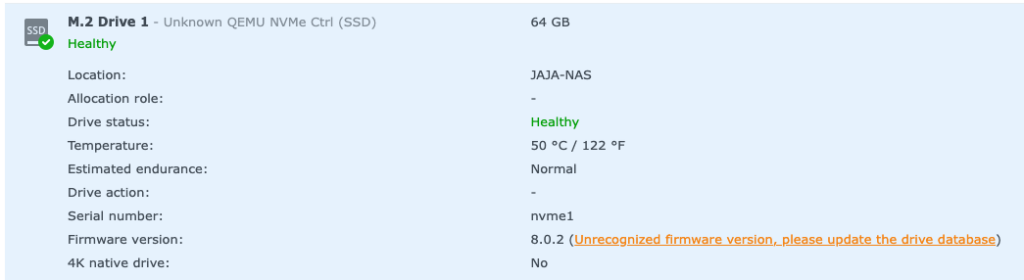
Proxmox does not yet support adding NVME drives using the web interface. It has to be added using a custom args for QEMU.

To do so, open the VM config file in a text editor: vi /etc/pve/qemu-server/100.conf

args: -drive file=/dev/zvol/rpool/data/vm-100-disk-1,if=none,id=nvme1 -device nvme,drive=nvme1,serial=nvme1

file is the location of the image in the hard drive. Since I’m using ZFS, it is in /dev/zvol/rpool/data/vm-100-disk-1.

I created this image using the Web UI but it is unattached. It is created in a real NVME disk.

device is how it will show-up in the guest.

QEMU docs on NVME emulation: https://www.qemu.org/docs/master/system/devices/nvme.html

Patch for Proxmox NVME emulation that has not yet been merged: https://bugzilla.proxmox.com/show_bug.cgi?id=2255

Proxmox Enable IOMMU

/ Compute /
vi /etc/default/grub
Find the line with "GRUB_CMDLINE_LINUX_DEFAULT"
Add `intel_iommu=on` or `amd_iommu=on`
Save
update-grub

PCIe ACS Override

There are motherboards that bundle peripherals together (does not support ACS).

A workaround is to override PCIe ACS by adding pcie_acs_override=downstream,multifunction in GRUB_CMDLINE_LINUX_DEFAULT.

This flags the kernel that a device can be “isolated”. It might have security and stability issues.

References: