Fixing Auto-Deploy
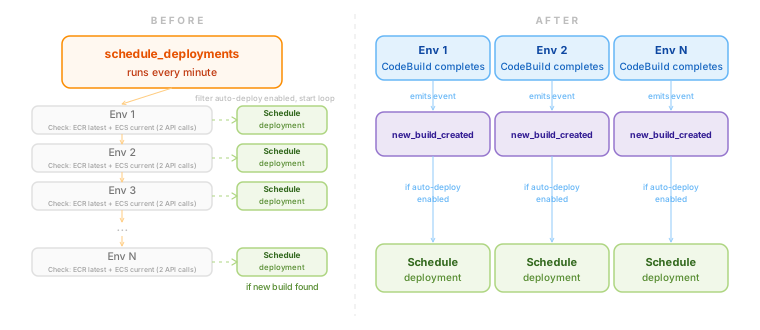
Auto-deploy is a feature where if there’s a new build image, it will deploy it… automatically. Customers started to occassionally report that auto-deploy isn’t working on their environment. The usual fix was to restart the cron job.
That only goes so far.
I didn’t know how it works before picking the issue up. I learned that there was a cron job called schedule_deployments. The way it’s implemented is it calls the AWS API for each environment to 1) fetch the latest ECR image and 2) compare the deployed image in ECS, then trigger a deploy if it does not match. That meant two API calls per environment for all environments. I started understanding why it was working fine before, but not anymore as we grew.
My initial solution was to optimize the current approach
CodeBuild already posts an app package manifest to our dashboard at the end of every build (from another feautre). I thought I could piggyback on that event and store a new_build flag on the environment when it triggers. I would then add a filter in schedule_deployments() to only process environments with new builds.
It was working. Fewer API calls, less chance of failing. PR ready for review.
The question that came up in the review was: if we already know when there is a new build, why are we still polling?
It made a lot of sense, and made me wonder why I restricted myself to optimizing only.
The final fix
New PR created, now with the fan-out approach. I removed schedule_deployments entirely. In its place, a new_build_created hook that triggers when the app package manifest comes in. From this hook, we check if auto-deploy is enabled, and if it is we schedule a deploy.
As a side-effect, this also fixed a bug in our auto-deploy logic where if a customer rolled back to an older build image, it would be reverted back again to latest image on the next cron run (oops).
Obvious in hindsight, of course. What’s important is there have been no auto-deploy complaints since this shipped to production.
Another fun, satisfying thing I was able to work on.