Exploring and Migrating to OpenResty
I have an old CyberPanel instance that still hosts live sites. Some have been running for more than ten years. They’re non-critical, and the server kept working, so I kept putting off maintaining it.
Then php2shell happened. After dealing with it at work, I needed to check my own server too. Most of the sites were on PHP versions that no longer receive security fixes.
I also wanted to try something. A friend mentioned using OpenResty with Lua to route requests to PHP-FPM sockets. I didn’t know the details of their setup, but I was curious if I could do something similar.
Getting the sites working first
I upgraded the sites while they were still on CyberPanel and LiteSpeed. That way, if something broke later, I would have fewer things to check.
Old WordPress installs needed core and plugin updates before they could run on PHP 8. A custom theme had an unquoted constant, a plugin used create_function(), and a small Laravel app needed a framework upgrade.
I also found web shells, a backdoor plugin, and forgotten copies of old sites inside live web roots. The sites were responding fine, but there was a lot I hadn’t been seeing.
One config for the sites
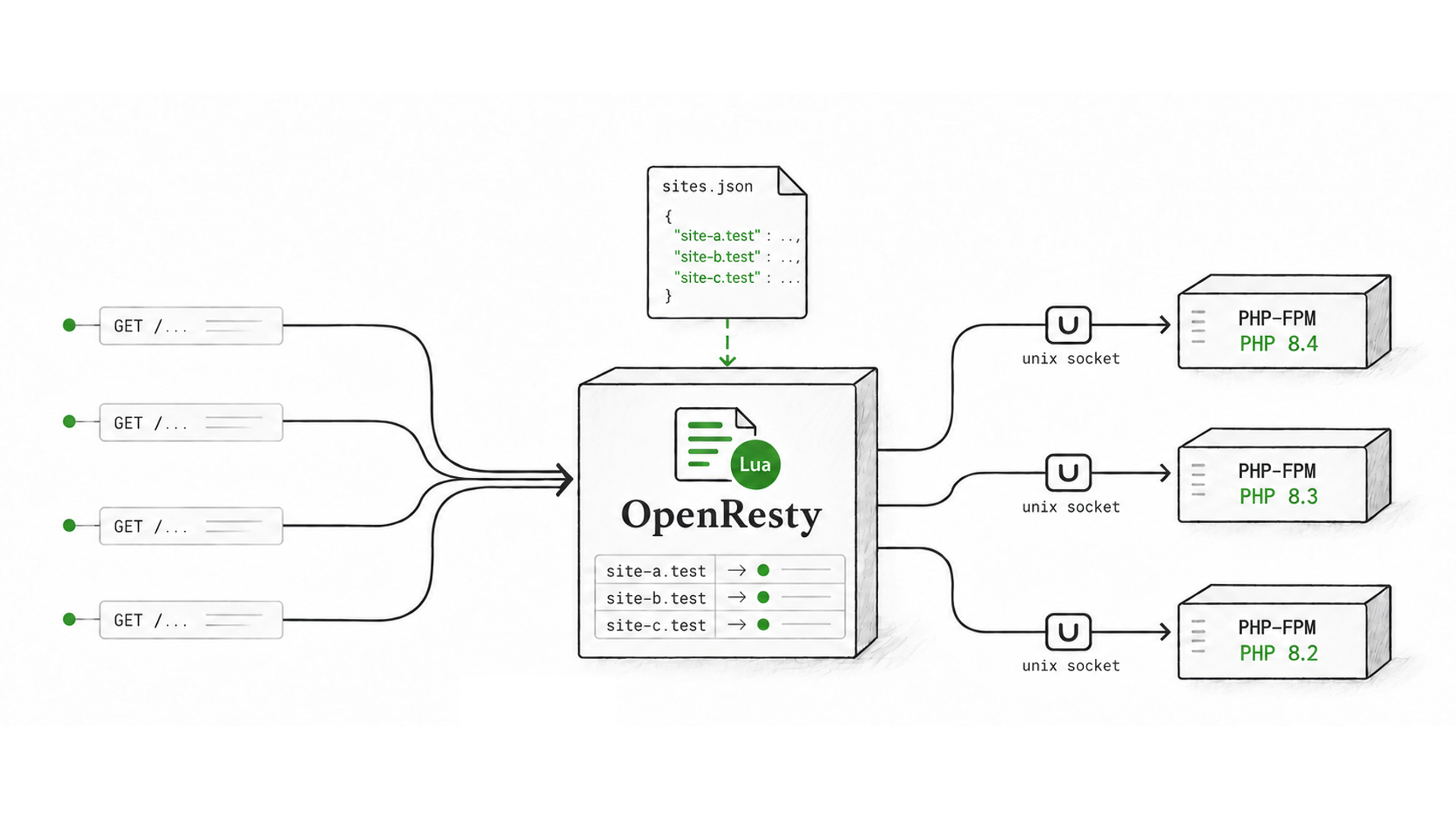
OpenResty is nginx with Lua support. The idea is to let Lua look up the hostname and tell nginx which directory and PHP-FPM socket to use.
Each site has an entry in sites.json:
{
  "example.com": {
    "root": "/home/example.com/public_html",
    "user": "example",
    "kind": "php",
    "cert": "example.com",
    "https": true,
    "php": "8.4"
  }
}
Lua keeps the routes in memory. It selects the certificate during the TLS handshake, then uses the request’s hostname to choose the site. nginx serves static files directly and passes PHP requests to the right FPM socket.
flowchart TD
request[Browser sends a request] --> openresty[OpenResty receives it]
openresty --> lua[Lua finds the site's directory and PHP pool]
lua --> route{What is requested?}
route -->|Static file| static[nginx reads the file]
route -->|PHP page| php[PHP-FPM runs the application]
static --> response[OpenResty sends the response back to the browser]
php --> response
Each Linux account gets its own PHP-FPM pool. Sites under the same account still share permissions, so I moved the contracts app into its own user and pool. The pools use ondemand so workers stop when idle. Useful on a small VPS.
The config also supports choosing a PHP version per site, though I’ve only installed and tested 8.4 so far. Databases mostly stayed as they were: local MariaDB, and SQLite for the contracts app.
CyberPanel and LiteSpeed are gone now. Lua looks up the hostname, nginx serves the files, and PHP-FPM runs the application. I can follow a request from its hostname to a directory and a PHP socket. Pretty happy to have this working.
Live configuration updates
I wanted to add sites or change their PHP sockets without reloading OpenResty.
A small root-owned publisher checks sites.json and the certificate files, validates the changes, and writes a complete snapshot. The Lua workers pick it up and replace their in-memory routes and certificates together. The snapshot is private because it contains TLS keys; the PHP accounts can’t read it.
This implementation uses one-second polling in the publisher and workers, so updates normally take about two seconds. Requests use the in-memory tables. If an update is invalid, the last valid configuration keeps working.
I tested adding and removing a hostname, switching PHP sockets, and replacing a certificate. The OpenResty master and worker process IDs stayed the same throughout.
Next steps
- Try Linux
inotifyevents instead of polling, so configuration changes can notify the workers directly. - Use OpenResty as a reverse proxy across my homelab sites, with a primary and secondary site. Start with manual failover.
- Move files and uploads to NFS shares with replication between sites.
- Add MySQL primary/replica replication.
- Keep PHP-FPM workers warm while retaining separate pools per account. More RAM, but less startup delay.
For next time!